

Title: Back Office Automation for Small Retail Businesses: The 2026 Essential Checklist
Meta Description: Stop wasting weekends on bookkeeping. Learn how back office automation for small retail businesses can reclaim 15+ hours a week and eliminate inventory errors with our pragmatic 2026 guide.
URL Slug: back-office-automation-small-retail-checklist-2026
It is 10:00 PM on a Sunday, and you're staring at a spreadsheet instead of sleeping. You're trying to reconcile why your online store says you have three units left while your physical shelf is empty. If this sounds familiar, you aren't alone. Implementing back office automation for small retail businesses is no longer a high-tech luxury. It's a survival strategy for the modern shop owner who is tired of manual data entry errors and lost revenue.
We agree that you didn't open your doors to spend your life as a part-time data entry clerk. You want to focus on your customers and your marketing, but the manual grunt work keeps pulling you back. It's a common trap that leads to burnout and costly mistakes that hit your bottom line. You deserve a system that works as hard as you do.
This guide will show you how to reclaim 15+ hours every week by putting repetitive admin tasks on autopilot. We've put together a pragmatic 2026 checklist covering everything from financial syncing to real-time inventory management. You'll learn how to build a streamlined back office that runs itself, giving you the freedom to finally focus on growth and your community.
Key Takeaways
- Stop wasting time on manual data entry by identifying which repetitive admin tasks are best suited for software-driven workflows.
- Sync your online and in-store inventory automatically to prevent overselling and ensure your stock levels are always accurate.
- Implement back office automation for small retail businesses to get real-time financial data and stop spending your weekends on bookkeeping.
- Use our 2026 checklist to audit your current point-of-sale and accounting systems for better integration and fewer technical headaches.
- Focus on your customer experience and marketing while your back office systems handle the mundane logistics in the background.
What is Back Office Automation for Small Retail?
Back office automation is the digital plumbing of your store. While front-office technology focuses on the customer experience, like your website design or the checkout counter, back-office systems handle the invisible work that keeps the lights on. It is the process of replacing manual, repetitive admin tasks with software-driven workflows that "talk" to each other. For a local shop owner, this means your sales data, inventory levels, and accounting software operate as a single, cohesive unit.
In 2026, this isn't just a convenience; it's a necessity. The cost of manual labor continues to rise, and the margin for error has shrunk. Customers expect real-time accuracy whether they are browsing your shelves in Wenatchee or clicking "buy" from their phone. If your systems aren't automated, you're likely making decisions based on old data. Back office automation for small retail businesses levels the playing field, allowing a single-location boutique to operate with the same data precision as a national big-box chain.
The Hidden Cost of Manual Administration
Many retailers don't realize they're suffering from an "admin drain" until they actually track their time. Industry observations often point to a 15-hour weekly loss for owners who handle bookkeeping and inventory updates manually. This isn't just lost time; it's lost money. Manual data entry frequently leads to "inventory leakage," where small discrepancies between recorded stock and actual stock result in missed sales or over-ordering. Keeping these systems connected and functional is vital, which is why consistent small business website support is the safety net that ensures your automation doesn't skip a beat when you need it most.
Retail-Specific Automation vs. General Business Tools
A local retail shop has needs that a standard office or a software company simply doesn't share. You deal with physical goods, shipping logistics, and sales tax across different jurisdictions. General business tools often lack the "mobile-first" flexibility that a busy owner needs while moving between the stockroom and the sales floor. You need to be able to check stock levels or approve a vendor payment from your phone, not just a desktop in a back room. In the 2026 retail landscape, back-office automation is the digital infrastructure that synchronizes inventory, sales, and financial data across all channels without manual intervention. It turns your business from a collection of spreadsheets into a streamlined, high-performance machine.
The 5 Core Pillars of Retail Workflow Efficiency
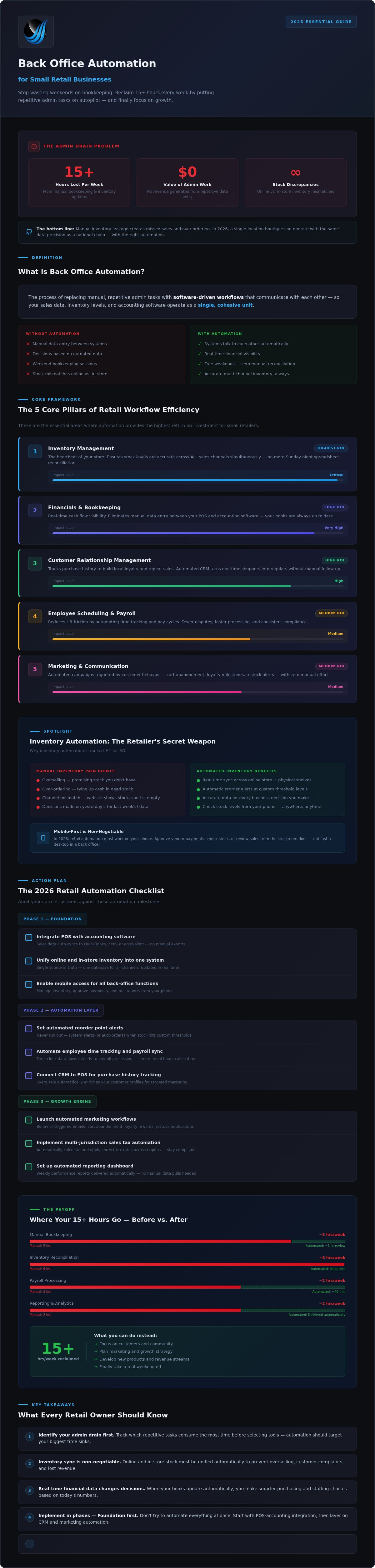
Efficiency in retail isn't about working harder; it's about building a system where data flows without your constant supervision. To achieve this, we focus on five core pillars that transform a chaotic shop into a streamlined operation. These pillars represent the essential areas where back office automation for small retail businesses provides the highest return on investment.
- Inventory Management: The heartbeat of your store, ensuring stock levels are accurate across all sales channels.
- Financials and Bookkeeping: Provides real-time cash flow visibility and eliminates manual data entry.
- Customer Relationship Management (CRM): Tracks purchase history to build local loyalty and repeat sales.
- Employee Scheduling and Payroll: Reduces HR friction by automating time tracking and pay cycles.
- Marketing and Communication: Uses automated email and SMS follow-ups to keep your brand top of mind.
| Workflow Area | Manual Method (The Drain) | Automated Method (The Fix) |
|---|---|---|
| Invoicing | Writing and mailing paper invoices manually. | Auto-generated digital invoices with payment links. |
| Sales Sync | Tallying end-of-day receipts into a spreadsheet. | POS data pushes directly to accounting software. |
| Staff Shifts | Texting employees and using a paper calendar. | Mobile app scheduling with automated reminders. |
Pillar 1 & 2: The Financial Foundation
For retailers in Soap Lake or Wenatchee, cash flow is king. Automated invoicing is particularly effective for service-retail models, like a boutique that also offers custom tailoring, because it prevents late payments by sending reminders automatically. By connecting your POS system directly to accounting software like QuickBooks or Xero, you eliminate the risk of human error. This connection ensures your financial reports are always current. Additionally, an SEO-ready site structure acts as the digital storefront for these systems. It captures local search intent and ensures that when a customer looks for a product online, your automated systems are ready to meet them. If you're struggling to get these systems to talk to each other, you can reach out to our technical team for a workflow audit.
Pillar 3 & 5: Driving Repeat Business
Automation allows you to maintain personal relationships at scale. A robust CRM can trigger "We miss you" coupons or birthday discounts based on a customer's actual purchase history. This keeps your local audience engaged without you having to lift a finger. In Moses Lake, boosting your local SEO often depends on consistent customer feedback. You can automate the collection of Google Reviews by triggering a text request immediately after a successful sale. To make these automated flows even more engaging, many owners are now integrating social media video production into their email sequences. A quick, automated video update about a new arrival feels personal and professional, proving that high-tech tools can still offer a high-touch experience.
Inventory Automation: The Retailers Secret Weapon
Managing a physical storefront in Wenatchee while simultaneously selling on Shopify or Amazon is a recipe for inventory chaos without the right systems. If a customer buys your last artisanal candle in-person at 2:00 PM, but your online store doesn't update until 6:00 PM, you've just sold a product you don't have. This is where back office automation for small retail businesses becomes your most valuable employee. It acts as a single source of truth, ensuring your digital and physical shelves are always in sync.
Syncing Physical and Digital Storefronts
Modern retail thrives on the "hybrid" model, but this requires precision. Implementing a "buffer stock" strategy is a smart way to prevent overselling. For instance, you can set your system to show an item as "out of stock" online when you only have two units left in the store. This protects the experience for local customers who walk in expecting to find that item. Real-time synchronization is also critical for Buy Online, Pick Up In Store (BOPIS) orders. To keep these connections reliable, consistent website maintenance in Wenatchee ensures your inventory plugins and API connections stay functional through every software update.
Automation also streamlines the "grunt work" of stock management through these key features:
- Low-Stock Alerts: Receive an automatic notification the moment a product hits a specific threshold.
- Automated Purchase Orders: Generate and send orders to your local Washington suppliers the moment stock gets low.
- Mobile-First Audits: Use barcode scanning on your phone to perform cycle counts without a clipboard and pen.
Predictive Ordering and Seasonal Shifts
Your sales data tells a story about your community. By using historical data, your system can predict the summer rush for outdoor gear in Seattle or the increased demand for winter essentials in Soap Lake. Instead of guessing how much to order, you rely on hard numbers. This automation also extends to the often-messy world of returns and exchanges. When a customer returns an item, the system automatically adds it back to your active inventory and updates your financial records. For a 100-SKU boutique, automating these inventory workflows can eliminate five hours of manual counting every week while significantly reducing the risk of costly stockouts.
The 2026 Retail Automation Checklist
Moving from the theory of efficiency to a functional shop floor requires a disciplined roadmap. You don't need to disrupt your entire operation in a single weekend. Instead, follow this structured approach to implementing back office automation for small retail businesses in a way that minimizes risk while maximizing your reclaimed time.
Step 1-3: Planning and Selection
Success starts with identifying where your "leaks" are. Before you buy any new software, you must understand your current manual workload. Use the following steps to prioritize your transition:
- Conduct a Manual Task Audit: Record every administrative task you perform for one week. If it involves a clipboard, a spreadsheet, or manual typing, write it down.
- Apply the Time vs. Impact Matrix: Plot your tasks on a simple grid. Focus your first automation efforts on tasks that are "High Time/Low Skill," such as reconciling daily sales or updating inventory stock levels.
- Verify Tech Stack Connectivity: Don't buy "siloed" software. Ensure your POS, website, and accounting tools have open APIs or native integrations.
Choosing the right foundation is critical. Ensure your integrated retail apps are supported by secure, managed web hosting. This prevents the lag and sync errors that often occur when small businesses try to run complex automation on generic, low-budget servers.
Step 4-5: Implementation and Maintenance
Once you've selected your tools, the focus shifts to execution and long-term stability. Use this checklist to guide your rollout:
- Pilot a Single Workflow: Choose one high-impact task, such as automated low-stock alerts, and run it for 30 days before adding more complexity.
- Standardize Staff Training: Create a simple "How-To" for your team. Automation only works if the data being fed into the system at the point of sale is accurate.
- Automate Your Safety Net: Set up off-site, encrypted data backups that run every 24 hours. This protects you from the "nightmare scenario" of a sync error wiping out your customer history.
- Secure Local Support: Establish a relationship with a technical partner who can respond immediately if a system goes offline during a busy holiday rush.
Pragmatic automation is about building a system that serves your life, not one that creates a new full-time job managing software glitches. If you want a professional eye to review your current tech stack for compatibility, you can schedule a back-office audit with our team to ensure your infrastructure is ready for 2026.
Strategic Implementation with Dulyfixed
Automation is only as powerful as the infrastructure supporting it. At Dulyfixed, we act as your local Soap Lake partner for retail modernization. We don't just hand you a login for a new piece of software and wish you luck. Instead, we build the SEO-ready site structures and landing pages that capture the very data your automation needs to thrive. By focusing on the underlying technical performance of your digital storefront, we ensure that your back office automation for small retail businesses has a reliable, high-speed foundation.
We also provide managed technical support to act as your safety net. This means if a sync between your POS and your accounting software hits a snag, you have a local expert to call rather than a distant 1-800 number. Our goal is to ensure your new efficiency doesn't become a new technical headache. We even integrate digital video production and custom branding directly into your automated marketing flows. This ensures that while your systems are running on autopilot, your brand still sounds and looks like you.
The Dulyfixed Approach: Pragmatic and Results-Oriented
We believe in human-first value. Technology should serve your life, not the other way around. We specialize in bridging the gap between a broken, manual back office and a high-performing brand that runs smoothly. For example, we've helped local Washington businesses streamline their onboarding and internal workflows, turning hours of paperwork into minutes of automated data flow. This pragmatic approach focuses on what actually works for a shop in Wenatchee or a boutique in Soap Lake; we prioritize stability over chasing every shiny new tech trend.
Your Next Steps to a Streamlined Back Office
Before you invest in expensive software subscriptions, you need a professional audit. Many owners buy tools they don't need or systems that won't talk to each other. A pragmatic audit identifies exactly where your time is being wasted and which tools will provide the fastest return on investment. We're here to discuss custom automation needs for Washington businesses that want to grow without adding more admin stress. If you're ready to stop spending your weekends on spreadsheets, contact Dulyfixed for a pragmatic back-office audit and let's get your systems working for you.
Take Control of Your Store's Future
Retail in 2026 demands speed and accuracy that manual spreadsheets simply can't provide. By implementing the core pillars of efficiency and automating your inventory, you aren't just saving time; you're protecting your margins. The 15 hours you reclaim each week can finally go toward creative marketing, community engagement, or improving your customer experience.
Strategic back office automation for small retail businesses doesn't have to be a technical nightmare. With decades of small business tech experience and deep local roots in Soap Lake and Wenatchee, our team understands the practical realities of running a shop in Washington. We provide the managed support and SEO-ready infrastructure you need to ensure your systems remain stable and profitable. This isn't about replacing your team; it's about giving them better tools to succeed.
Don't let admin friction hold your business back any longer. Let's build a back office that runs itself so you can focus on what you love. It's time to stop fighting your software and start letting it work for you.
Get a Pragmatic Back-Office Audit from Dulyfixed
Frequently Asked Questions
Is back office automation too expensive for a small retail shop?
Back office automation for small retail businesses is highly scalable and often costs less than the labor hours it replaces. You don't need a massive upfront investment to see results. Many retailers start with simple, low-cost integrations between their existing POS and accounting software. By focusing on the most time-consuming manual tasks first, the system pays for itself through reclaimed hours and reduced data entry errors. It's about working smarter with the budget you have.
How much time can I realistically save with retail automation?
Most small shop owners realistically reclaim 15 or more hours every week by automating their most repetitive admin tasks. This time usually comes from eliminating manual inventory counts, end-of-day reconciliation, and physical bookkeeping entries. Instead of spending your Sunday nights staring at spreadsheets, you can focus on high-impact activities like curating new collections or improving your marketing strategy. The efficiency gains become apparent within the first month of implementation.
Do I need to replace my current POS system to start automating?
You often don't need to replace your entire POS system to begin. Most modern retail platforms offer APIs or native integrations that allow them to talk to other software. Our team can audit your current tech stack to see if your existing system supports back office automation for small retail businesses. If your POS is outdated and lacks connectivity, we might suggest a migration, but we always prioritize pragmatic solutions that use your current tools.
Will automation make my retail business feel less personal to customers?
Automation actually makes your business feel more personal because it removes the busy work that keeps you away from your customers. When your back office runs itself, you have more energy for face-to-face interactions on the sales floor. You can also use automated CRM tools to send highly personalized messages, like birthday discounts or notes based on purchase history. It's high-tech support for a high-touch customer experience that builds lasting local loyalty.
What happens if my automated systems go offline?
Having a nightmare scenario plan is essential for any digital system. If an automated sync fails, your local technical support partner is your first line of defense. We recommend using managed web hosting with redundant backups to ensure your data is always safe and recoverable. While no system is perfect, a local partner in Soap Lake or Wenatchee can get you back online much faster than a distant, corporate help desk could ever manage for you.
Can back office automation help with local SEO and marketing?
Yes, automation is a powerful tool for boosting your local visibility. For example, you can automate review requests to go out via SMS immediately after a purchase, which helps your ranking in local search results. You can also sync your real-time inventory with your Google Business Profile. This ensures that when local shoppers search for a specific product, they see that it's currently in stock at your physical location, driving more foot traffic to your store.
Is my data secure when using third-party automation tools?
Data security is a top priority when connecting third-party tools. You should always select software that follows industry-standard encryption and security protocols. We help you evaluate these tools to ensure your customer and financial data remains protected. Using secure, managed hosting for your website and integrated apps adds another layer of defense. It's vital to vet every integration to ensure your business remains compliant and your sensitive data stays private and secure from external threats.
How long does it take to implement a basic automation checklist?
Implementing a basic checklist usually happens in manageable phases. An initial audit of your manual tasks takes about a week, while setting up your first pilot automation, like inventory syncing, typically takes another two weeks. You don't want to rush the process and break your existing workflows. By taking a methodical approach, you can ensure each new system is stable and your staff is fully trained before moving to the next step in your modernization plan.


