

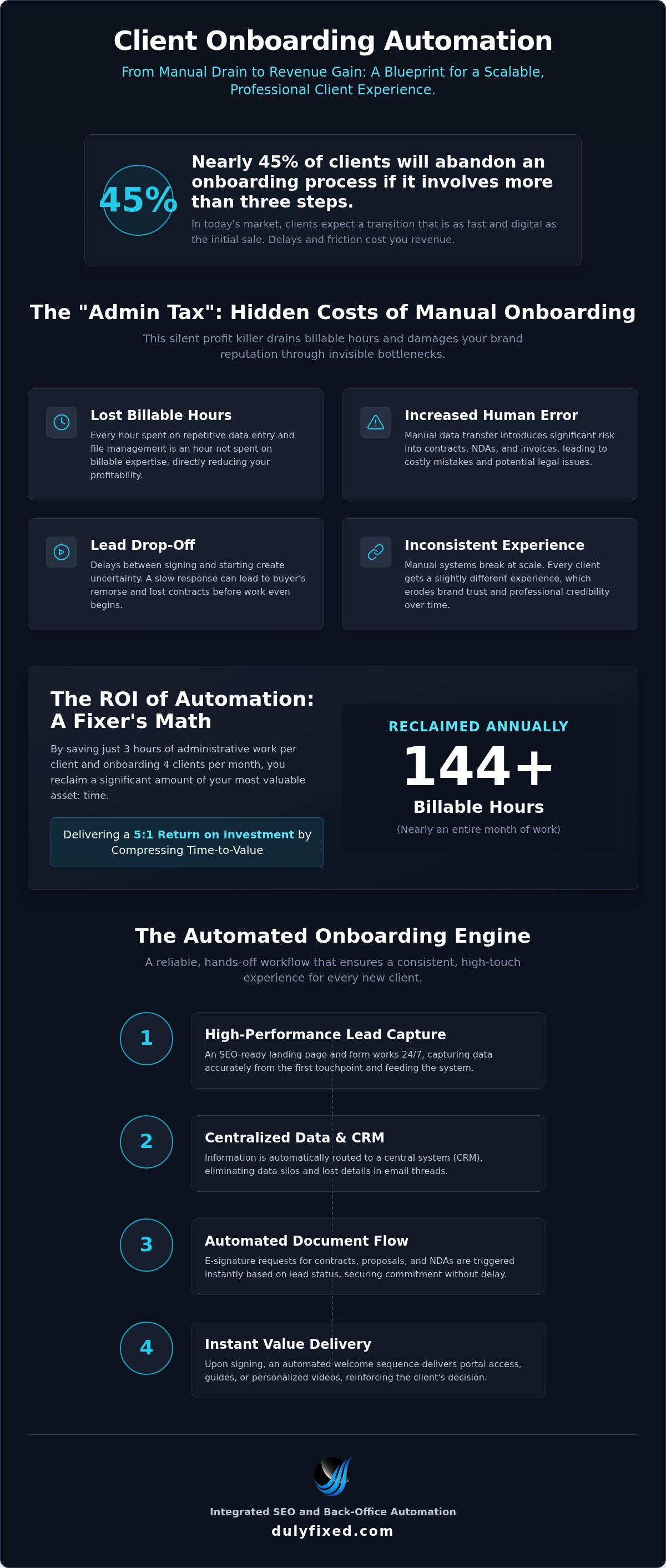
Nearly 45% of users will abandon an onboarding process if it involves more than three steps. In 2026, your clients expect a transition that is as fast and digital as the initial sale. If you're currently spending your evenings manually copying data into invoices, a client onboarding automation system isn't just a luxury; it's a necessity for survival. Most small business owners agree that while they want to provide a professional first impression, the reality of repetitive data entry often leads to slow response times and lead drop-off.
This guide explains how to replace manual paperwork with a hands-off workflow that saves time and secures your revenue. We'll explore how modern tools can deliver a 5:1 return on investment by compressing your time-to-value. You'll learn why a seamless experience actually starts with a strong technical foundation, which is why Dulyfixed Small Business Solutions integrates these systems directly into our SEO-ready site structures and managed hosting. By the end of this article, you will have a clear roadmap to reclaim your schedule and provide a professional, consistent experience for every new client.
Key Takeaways
- Identify the "Admin Tax" by uncovering exactly where manual data entry is draining your billable hours and slowing down project starts.
- Use mobile-first landing pages and SEO-ready site structures as the high-performance entry points for your automated engine.
- Build a reliable client onboarding automation funnel that centralizes data, triggers contracts, and handles invoicing without manual intervention.
- Discover how local Central Washington professionals in Moses Lake and Wenatchee are scaling their operations by automating intake and back-office tasks.
- Adopt the "fixer" mindset to continuously iterate on your workflow, ensuring your systems remain stable and efficient as you grow.
The Hidden Cost of Manual Client Onboarding
Every hour you spend copy-pasting a client's name from an email into a contract is an hour you aren't billing for your actual expertise. This is the "Admin Tax," a silent profit killer for professionals in Moses Lake and across Central Washington. While large corporations like IBM report that automation reduces human error by 30%, they often overlook the emotional burnout that hits a small business owner. Manual onboarding creates several invisible bottlenecks that can stall your progress:
- Lost billable hours spent on repetitive data entry and file management.
- Increased risk of human error in contracts, NDAs, and project invoices.
- Slower response times that lead to potential lead drop-off and buyer's remorse.
- Inconsistent client experiences that damage long-term brand reputation.
First impressions are fragile. If a client signs a proposal and then waits 24 hours for a "welcome" email, uncertainty starts to settle in. This period is a critical phase of organizational socialization where the client's perception of your brand is solidified. A delay suggests that you're disorganized or, worse, that their project isn't a priority. In the Middle of Funnel (MOFU) state, your job is to continue educating the client before they ever sign. If your "system" relies on you remembering to send a PDF, you're one busy afternoon away from a lost contract or a missed invoice.
Why 'Good Enough' Manual Systems Fail as You Scale
Manual systems have a clear breaking point. When you're managing two clients, a sticky note on your monitor works fine. When that number hits ten, things slip through the cracks. You might send the wrong version of a contract or forget to CC a partner. These small friction points create inconsistent messaging that erodes brand trust. Reliability is the foundation of a professional service. Client onboarding automation provides a stable framework that ensures every client receives the same high-touch experience, whether you're at your desk or out at the lake. It transforms your workflow from a series of frantic tasks into a repeatable, scalable process that builds authority.
The ROI of Onboarding Automation for Small Biz
Let's look at the "Fixer's math" for a typical local service provider. If you save three hours of administrative work per client and onboard just four clients a month, you've reclaimed 144 hours over a year. That's nearly an entire month of billable time returned to your pocket. Beyond the clock, automation delivers success signals, such as immediate digital receipts, instant portal access, and automated welcome videos, that drastically reduce client churn. By providing these touchpoints instantly, you signal that your business is modern, secure, and ready to deliver. If you're ready to stop the manual grind, you can reach out to our team to discuss a custom back-office setup. Client onboarding automation through Dulyfixed Small Business Solutions is the strategic use of integrated software to replace manual administrative tasks with a seamless, digital workflow that accelerates project start times and reinforces brand authority.
Essential Components of an Automated Onboarding Workflow
Building a reliable system requires a connected engine where every part talks to the next. The process starts at the very first touchpoint: your landing page. An SEO-ready lead capture engine works 24/7, gathering data while you sleep. By integrating this with a CRM, you centralize client data immediately. This eliminates the need to dig through email threads to find a phone number or project detail. When done correctly, client onboarding automation ensures that no detail is lost between the initial inquiry and the project kickoff.
Effective document management is the next pillar. In 2026, clients expect to sign contracts and NDAs digitally. Automated e-signature tools can trigger as soon as a lead is qualified. Once the signature is captured, a welcome sequence should fire off. This might include a personalized video or a PDF guide that delivers immediate value. As IBM notes, streamlining the client journey isn't just about speed. It's about creating a cohesive narrative from day one.
The Tech Stack: Choosing Pragmatic Tools
Choosing the right tools for client onboarding automation doesn't have to be overwhelming. Most small businesses use "glue" software to connect their tools. Zapier is excellent for its simplicity and vast library of integrations. Make offers more granular control for complex, multi-branching workflows. The foundation of this stack is your website. Mobile-first forms are essential because most clients will initiate contact from their phones. Managed web hosting is also critical. If your site goes down, your entire automation engine stops.
| Feature | Zapier | Make (formerly Integromat) |
|---|---|---|
| Learning Curve | Very low; uses intuitive "if this, then that" logic. | Moderate; requires better understanding of data mapping. |
| Workflow Complexity | Best for linear, straightforward tasks. | Best for complex, multi-step branching logic. |
| App Support | Extensive library with 6,000+ native integrations. | Fewer native apps but offers deeper API control. |
Lead Scoring and Auto-Qualification
Not every lead is a good fit. You can use conditional logic in your forms to filter "tire kickers" before they ever reach your inbox. For example, if a lead's budget doesn't meet your minimum, the system can automatically send a polite referral email instead of a booking link. Using professional landing page design helps set these expectations early. Dulyfixed Small Business Solutions often helps clients audit their current tools to see where technical support and back-office automation can bridge these gaps.
Step-by-Step Guide: Building Your First Automated Funnel
Moving from a manual grind to a streamlined system requires a clear blueprint. You cannot automate a mess, so the first step is always to audit what you are currently doing. We recommend the "Sticky Note Method." Write every single action you take, from the first email to the final invoice, on a separate note. This visual map often reveals redundant steps or long delays that frustrate new clients. Once you see the holes in your process, you can begin the transition to client onboarding automation with confidence.
- Step 1: Map your current manual process. Identify every touchpoint, email template, and document you currently send by hand to find the bottlenecks.
- Step 2: Optimize your entry point. Your website landing page is your digital front door. It must be a mobile-first, SEO-ready structure that captures lead data cleanly into a database rather than just an inbox.
- Step 3: Connect to your CRM. Use back-office automation to push that data into your CRM. This creates a single source of truth for every client interaction without you typing a single word.
- Step 4: Trigger the Welcome Kit. Set up a workflow that fires off a contract, an initial invoice, and a welcome packet the moment a lead is qualified or pays their deposit.
Mapping the Client Journey
The most dangerous part of any professional relationship is "The Gap." This is the silence that happens after a client pays but before the work actually starts. You can bridge this by inserting professional digital video into your automated sequence. A short, thirty-second video saying "I have received your payment and here is what happens next" builds massive trust. Every automated message should answer the client's internal question: "What should I do next?" This keeps the momentum high and prevents buyer's remorse.
Testing and Troubleshooting Your Workflow
Before you go live, run an "Internal Test Drive." Sign up for your own service using a personal email address. Watch how the emails land, check the formatting on your phone, and ensure the links actually work. You should also set up internal notifications so you stay in the loop. A simple Slack or text alert when a client signs a contract lets you celebrate the win without having to babysit the software. Testing your automation on a smartphone is non-negotiable in 2026 because your clients will likely open their welcome emails and sign contracts while on the go. If you need help getting the technical foundation right, Dulyfixed Small Business Solutions provides technical support and automation audits to ensure your system is stable from day one.
Local Business Efficiency: Why Moses Lake Professionals Are Automating
Being a "local" business in Central Washington shouldn't be an excuse for outdated, paper-heavy systems. In fact, the physical distance between towns like Soap Lake, Moses Lake, and Wenatchee makes client onboarding automation even more vital. Local professionals who embrace these tools aren't just saving time; they're outcompeting larger, distant firms by combining small-town service with big-city speed. Industry data from 2026 shows that onboarding automation provides an average ROI of 5:1, which is a massive advantage for a lean local operation.
Consider a typical Moses Lake contractor. By moving away from "call me back" messages to a mobile-first intake form, they can reduce their administrative time by up to 70%. Instead of spending Sunday nights writing quotes, the system handles the initial data capture and schedules the walkthrough automatically. Similarly, a Wenatchee law firm can use automated intake to handle sensitive client data securely. With the 2026 requirements of the US Corporate Transparency Act, firms are now cross-referencing information against the FinCEN database. Automation ensures this compliance happens instantly, rather than becoming a manual bottleneck for the legal team.
Industry-Specific Automation Hacks
Different sectors require different "fixer" strategies. For home services, the focus is on speed. Automated scheduling and quote follow-ups ensure you never lose a lead to a faster competitor. In professional services, the priority is security and document collection. For creative professionals, the onboarding process is a chance to showcase your brand's personality. You can even integrate custom music for brands into your automated welcome videos to create a high-end, "sonic" first impression that sets you apart from generic competitors. These small touches turn a cold process into a warm, professional introduction.
The Advantage of a Local Automation Partner
While you can hire a distant agency from Seattle or New York, Soap Lake and Moses Lake business owners often prefer "feet on the ground" support. There's a specific pragmatism to Central Washington business that requires tech solutions to be stable, long-term, and easy to manage. A local partner understands the regional market and can bridge the gap between advanced tech and practical daily use. If you aren't sure where to start, we recommend hosting a "digital audit" for your own business. Review every manual step in your current intake process and ask yourself if a machine could do it faster. If the answer is yes, it's time to consult with a technical support expert to build a system that works as hard as you do.
Scaling Your Small Business with Back-Office Automation
Successful client onboarding automation is often the "gateway drug" to full-scale business efficiency. Once you experience the relief of a contract signing itself while you're on a job site, you'll naturally look for the next manual bottleneck. Scaling a small business in Central Washington isn't about hiring more people to do repetitive work. It's about adopting a "fixer" mindset where you view your business as a machine that requires regular tuning. The goal is to move beyond the first week of a client relationship and automate the entire lifecycle, from project management to final invoicing.
True scalability happens when your back-office systems talk to each other without your intervention. If your onboarding form triggers a project in your management tool and sets up a recurring invoice in your accounting software, you've effectively replaced a part-time administrator with a few lines of code. This level of integration allows a two-person team in Moses Lake to operate with the professional polish of a twenty-person agency. However, custom system integration can get complex. If you find yourself spending more time fixing your automations than using them, that is the clear signal to seek professional technical support.
From Onboarding to Long-Term Retention
Automation shouldn't stop once the client is "in." You can use your system to maintain the relationship long-term. Set up an automated feedback loop that sends a survey or a request for a testimonial 30 days after a project starts. This data feeds back into your CRM, helping you predict future client needs or identify when a client might be ready for an upsell. Your SEO-ready site structure acts as the foundation here. It isn't just for finding new leads; it's the secure hub where your clients interact with your brand, ensuring that your marketing and operations are perfectly aligned.
Next Steps: Reclaiming Your Time
The final step in your automation journey is identifying the next operational bottleneck. Is it project reporting? Is it follow-up emails for past-due invoices? Whatever it is, there is likely a pragmatic technical solution. Maintaining these systems requires ongoing attention to ensure they remain stable as software versions update. If you're ready to move from manual chaos to a streamlined operation that respects your time, Contact Dulyfixed for a custom automation audit. We help local professionals build systems that work as hard as they do.
- Do you have a mobile-first lead capture form that works 24/7?
- Does your system automatically deliver contracts and E-signature requests?
- Is your client data synced directly to a CRM without manual entry?
- Are your initial invoices triggered the moment a project is initiated?
- Do you have an automated "Welcome Kit" or video to bridge the communication gap?
- Is there a feedback loop in place to capture testimonials automatically?
Ready to Reclaim Your Billable Hours?
Manual paperwork is a silent tax on your growth. By now, it's clear that client onboarding automation is no longer optional for small businesses aiming to thrive in 2026. Transitioning from "sticky note" workflows to a hands-off system ensures that your first impressions are consistent, your contracts are secure, and your invoices are paid on time. You've seen how local professionals in Moses Lake and Wenatchee are already using these tools to act like larger firms while maintaining their local touch.
At Dulyfixed Small Business Solutions, we bring decades of real-world industry expertise to help you build a stable foundation. Whether you need an SEO-ready site structure or a complete back-office overhaul, we provide the local technical support you need to succeed. Stop wasting your evenings on repetitive data entry and start focusing on the work you actually enjoy. Streamline your business today with Dulyfixed Small Business Solutions and take the first step toward a more efficient, profitable future. Your time is your most valuable asset; it's time you start protecting it.
Frequently Asked Questions
What is client onboarding automation for small businesses?
It is the strategic use of software to handle the repetitive administrative tasks required to start a new client relationship. Instead of manually emailing PDFs or copying data into spreadsheets, the system automatically triggers contracts, invoices, and welcome emails based on client actions. This ensures a consistent, professional experience every time you sign a new project without adding to your daily workload.
How much does it cost to automate my client onboarding process?
The financial investment depends on your team size and the complexity of your specific workflow. In 2026, specialized platforms like Rocketlane range from $19 to $59 per user per month for standard tiers, while enterprise solutions like OnRamp start around $15,000 per year. Most small businesses find that the return on investment through reclaimed billable hours far outweighs the monthly software subscription fees.
Will automation make my small business feel impersonal to clients?
On the contrary, automation often makes your business feel more responsive and attentive to new clients. By handling the "boring" paperwork instantly, you have more mental energy to focus on high-value human interactions during the project. You can also include automated personal touches, such as a custom welcome video, which would be difficult to manage manually for every single lead you receive.
What are the best tools for client onboarding automation in 2026?
The best tools are those that integrate seamlessly with your existing tech stack and website. Zapier and Make are the leading "glue" platforms that connect your website forms to your CRM and accounting software. For a dedicated onboarding experience, platforms like Rocketlane provide tiered plans that manage everything from document collection to project kickoff in one centralized and professional digital dashboard.
Can I automate onboarding if my business is local to Moses Lake or Wenatchee?
Yes, local businesses in Central Washington benefit significantly from these systems because they bridge the physical distance between clients and offices. Whether you are a contractor in Soap Lake or a law firm in Wenatchee, client onboarding automation allows you to maintain a professional digital presence that matches the quality of your in-person service. It helps you compete effectively with larger firms located in Seattle.
What is the difference between a CRM and an onboarding workflow?
A CRM is a database used to store and track client information, while an onboarding workflow is the series of active triggers that move a client through your process. Think of the CRM as the library and the workflow as the librarian who knows exactly which book to pull and when to send it. Both are essential components of a modern, efficient, and stable back-office setup.
How long does it take to set up an automated onboarding system?
A basic system can be operational in a few days, while a fully custom integration usually takes two to four weeks to refine. The timeline depends on how many tools you need to connect and the complexity of your current manual map. Starting with a simple intake-to-contract funnel allows you to see immediate results while you build out more complex features over time.
Do I need a new website to start automating my client onboarding?
You don't always need a full redesign, but your site must have a mobile-first, SEO-ready structure to feed the automation engine effectively. If your current site is slow or doesn't support modern form integrations, it will act as a bottleneck for your entire client onboarding automation strategy. We often recommend a technical audit to ensure your hosting and site structure can support your new workflows.


