

What if the most time-consuming part of your month wasn't the actual work, but the paperwork required to get paid for it? For many service providers in Wenatchee and Soap Lake, "billing day" is a dreaded ritual of manual data entry and awkward follow-up emails. It is a system that invites errors and creates a persistent drag on your growth. Transitioning to automated invoicing for small business is the most direct way to reclaim your schedule and ensure your cash flow remains consistent and predictable.
We know you didn't start your business to become a part-time debt collector. You likely agree that manual billing is a fragile process that limits your ability to scale effectively. This 2026 guide promises to show you how to eliminate manual errors and accelerate your cash flow using modern automated workflows. We will preview the core components of an automated system, how to choose the right software for your specific stage, and the practical steps for a seamless rollout. At Dulyfixed Small Business Solutions, we specialize in back-office automation that turns administrative hurdles into streamlined assets. Let's explore how to put your billing on autopilot.
Key Takeaways
- Reclaim billable hours by eliminating the "hidden tax" of manual administrative work and repetitive data entry.
- Establish a reliable system for automated invoicing for small business that manages triggers, payment gateways, and reconciliation without manual oversight.
- Recognize the "growth ceiling" of basic billing apps and learn when to move toward full-suite CRM integrations that scale with your operations.
- Prepare your back-office for automation by auditing existing accounts receivable and cleaning customer contact data for error-free delivery.
- Connect your billing workflows to mobile-first landing pages to capture lead data and accelerate the transition from prospect to paid client.
Why Manual Billing Is Costing Your Small Business More Than Just Time
Manual billing is a silent leak in your operations that drains your energy and your bottom line. When we define automated invoicing for small business, we are looking at a system that handles the entire lifecycle of a payment. It generates the invoice, sends it to the client, and tracks its status without you needing to touch a single key. It shifts your role from an administrative clerk to a focused business owner who can prioritize high-value work.
The "hidden tax" of manual billing is the direct loss of billable hours. Every thirty minutes spent fixing a typo on a PDF or re-calculating sales tax is time you could have spent serving a client. For local businesses, manual errors like wrong totals or missing line items do more than just delay a check. They damage the professional trust you have worked hard to build. Precision in your billing reflects the precision of your work, and automation ensures that your first impression is always a professional one.
The Real Cost of Paper and PDF Invoicing
Sticking to paper or manual PDF invoices creates a ceiling on your growth. Whether you are operating in Seattle or Wenatchee, your business cannot scale if your administrative burden grows linearly with your client list. Manual systems are also inherently less secure. Sending sensitive payment details through standard email attachments exposes your clients to unnecessary risks. A modern system removes these vulnerabilities while speeding up your payment cycle through automated reminders that reduce your "Days Sales Outstanding" (DSO).
- Data Entry Fatigue: Repetitive tasks lead to human errors that cause disputes and payment delays.
- Scaling Friction: A manual process that works for five clients will eventually break your schedule as you expand to fifty.
- Reconciliation Gaps: Manually matching bank statements to invoices consumes hours of detective work every month.
Immediate Benefits of the "Set and Forget" Model
Adopting an automated workflow changes your cash flow from a trickle to a steady stream. By integrating digital payment options like ACH and credit cards, you remove the friction that prevents clients from paying immediately. It also improves the client experience by providing a professional, branded portal where they can settle their accounts with a single click. This creates a predictable revenue cycle that allows you to plan for future investments with confidence.
At Dulyfixed Small Business Solutions, we specialize in back-office automation that connects these billing tools to your existing digital presence. This approach ensures your financial data is centralized and accurate, making tax season a non-event rather than a crisis. It is about building a stable foundation that supports long-term growth rather than just managing today's tasks. By automating the request for payment, you can spend more time on the work that earns it.
The Anatomy of an Automated Invoicing Workflow
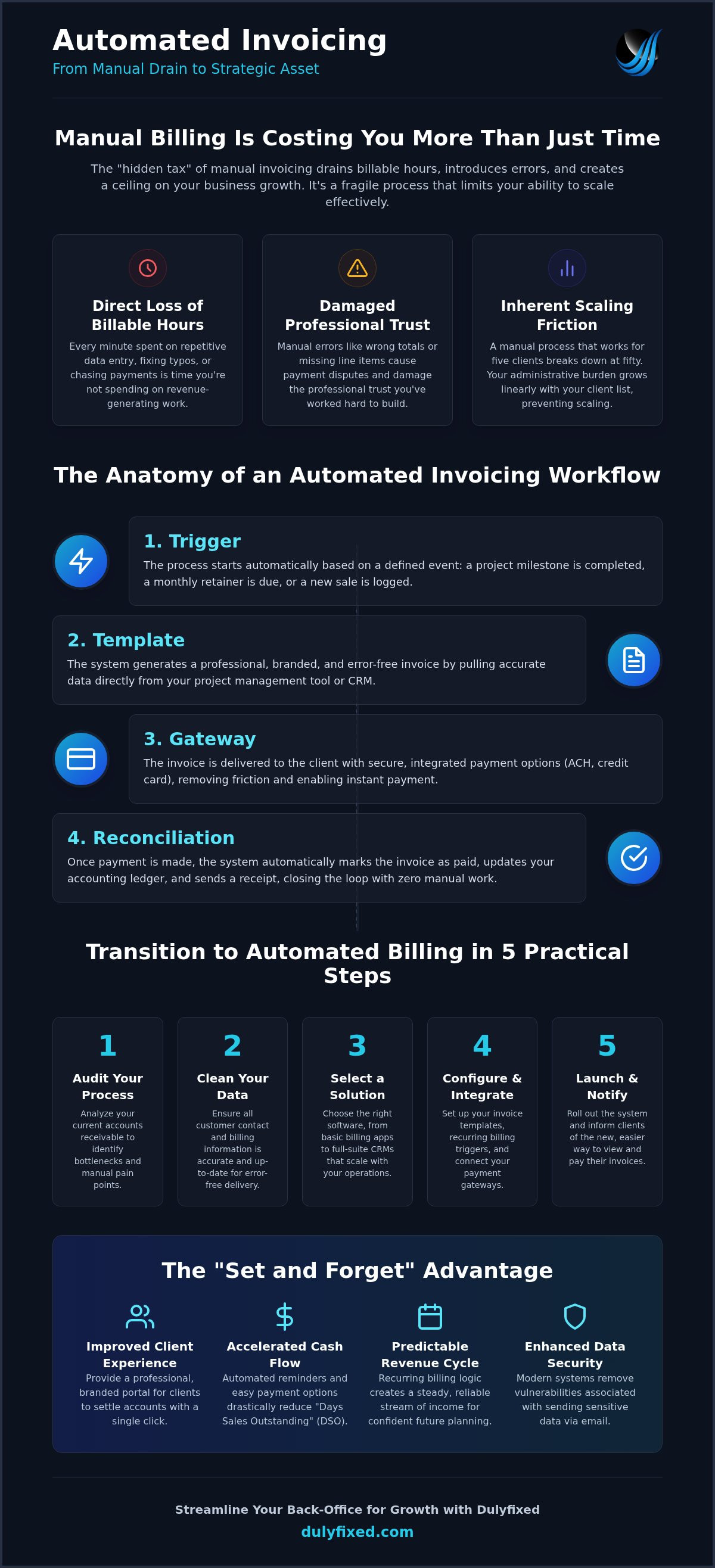
Understanding the internal logic of automated invoicing for small business is the first step toward building a resilient back-office. It is not merely about sending an email; it is a coordinated sequence that links your completed tasks to your revenue. A high-performance workflow consists of four distinct pillars: the trigger, the template, the gateway, and reconciliation. When these components are synchronized, your billing operates as a background utility rather than a manual hurdle.
A Payment Gateway is the digital bridge between your invoice and your bank account. For businesses that rely on subscriptions or monthly retainers, the system uses recurring billing logic to generate and send invoices on a fixed schedule. By enabling "Auto-Pay" features, you allow the system to securely charge a client's saved payment method on the exact due date. This creates a predictable revenue stream and removes the need for clients to manually log in for every transaction. Once the payment clears, the system handles the reconciliation, marking the invoice as paid in your ledger without any human intervention.
Triggers: When Does the Clock Start?
The "trigger" is the specific event that tells the software to initiate the billing process. This might be a "Project Milestone Reached" in your management tool or a "Monthly Anniversary" for a service contract. Automation also handles the friction of late payments by calculating fees and sending follow-up sequences. We recommend a 3-7-14 day rule: send a friendly reminder three days before the due date, another seven days after it is late, and a final notice at the 14-day mark.
Integrated Payment Gateways and Security
Offering multiple payment methods like Apple Pay, ACH, and credit cards significantly accelerates your payment cycle. Most clients pay faster when they can use biometric security on their phone or a saved bank profile. For owners in Soap Lake and across Washington, maintaining PCI compliance is vital. This industry standard ensures that sensitive cardholder data is handled with the highest level of encryption to prevent fraud.
At Dulyfixed Small Business Solutions, we ensure your managed web hosting environment is optimized to support these secure payment transitions. If your billing portal goes down, your cash flow stops. We focus on providing stable, high-performance structures so your clients always have a professional place to settle their accounts. If you are ready to modernize your billing, you can reach out for a consultation on back-office automation. This integrated approach ensures that every part of your digital presence works as a single, efficient unit.
Choosing the Right Invoicing Solution for Your Business Stage
Selecting a platform for automated invoicing for small business isn't a one size fits all decision. It requires an honest audit of your current transaction volume and your five year growth plan. If you are just starting out, a simple standalone tool might suffice. However, many owners eventually hit a "growth ceiling." This happens when your simple app becomes a silo, forcing you to manually copy data between your billing tool and your project management software. This fragmentation is exactly what automation is supposed to solve.
Accounting compatibility is a non-negotiable requirement. Your invoicing system must speak the same language as QuickBooks or Xero. Without a direct, real-time sync, you are back to manual data entry, which defeats the purpose of the transition. For service professionals working in the field, a mobile-first interface is equally critical. You should be able to trigger an invoice from your phone before you even leave the job site in Ephrata or Moses Lake. It ensures the billing happens while the value of your work is fresh in the client's mind.
When to Use Standalone Apps vs. Integrated Systems
Standalone apps are excellent for solo practitioners with low transaction volumes. They are easy to set up and get the job done quickly. But as your business matures and you begin using dedicated landing pages to capture leads, you will likely need an integrated system. An integrated back-office connects your marketing funnel directly to your billing. This prevents "feature bloat" by ensuring every tool in your stack has a specific, connected purpose. At Dulyfixed, we specialize in building SEO-ready site structures that feed lead data directly into your automated workflows, ensuring a seamless transition from prospect to paid client.
Essential Features Checklist for 2026
Modern billing software must do more than just send a bill. As business becomes more digital and regulations tighten, your system needs to handle the heavy lifting of compliance and branding. Look for these specific capabilities when evaluating your options:
- Washington State Tax Nexus: Your system should automatically calculate sales tax based on the client's location within Washington to ensure you stay compliant with state and local laws.
- Multi-Currency Support: If you work with remote contractors or international clients, your gateway must handle currency conversions and international fees without manual intervention.
- Custom Branding: Avoid generic templates that look like everyone else's. Your invoices should match your brand visual identity to maintain a professional appearance that builds long-term trust.
Choosing the right tool today prevents a painful and expensive migration later. We recommend looking for solutions that offer a clear path from simple billing to advanced back-office automation. It is about building a stable foundation that supports your business as it scales.
Transition to Automated Billing in 5 Practical Steps
Moving to a "set it and forget it" system requires a deliberate approach to protect your client relationships. You can't just flip a switch and hope for the best. To successfully implement automated invoicing for small business, you should follow a structured five-step path that prioritizes accuracy and communication. This migration ensures that your back-office stays stable as you scale.
- Step 1: Audit your accounts receivable. Review your records from the last six months to identify where payments typically stall.
- Step 2: Clean your customer data. Verify every client's billing email, primary contact, and physical address. Automation is only as good as the information you feed it.
- Step 3: Design a "Human-First" template. Create a layout that maintains your brand voice. Use a layout that feels professional but approachable, matching the visual identity of your business.
- Step 4: Run a pilot program. Pick three to five trusted clients in the Wenatchee or Soap Lake area. Ask for their feedback on the digital portal experience before moving everyone over.
- Step 5: Full rollout. Send a clear communication plan to your entire customer base, explaining how the new system makes their lives easier with secure payments and instant receipts.
Auditing Your Existing Billing Process
Before you automate, you must understand your current friction points. If your service business takes 15 days to send an invoice after a job is finished, that's your first bottleneck. Automation eliminates this lag by triggering the bill immediately upon completion. Identify which clients consistently pay on time; they are your best candidates for your initial pilot. You should also locate where manual errors most frequently occur, such as incorrect sales tax or missing purchase order numbers, so you can build rules to prevent them in the new system.
Crafting the Perfect Automated Email
The biggest fear with automation is losing the personal touch. You can avoid this by using dynamic tags to insert client names and project specifics into your messages. A subject line like "Invoice #1024 for [Project Name]" is clear, professional, and less likely to be flagged as spam. Your email body should be friendly and direct. If your business is known for being helpful and local, don't switch to stiff, corporate jargon just because a computer is sending the message. If you need help building these human-first workflows, contact Dulyfixed for expert back-office automation support. We specialize in making complex integrations feel seamless for both you and your customers.
Optimizing Your Back-Office: Why Integrated Automation Wins
Invoicing is often treated as a lonely island in a business's operations. This is a mistake. To truly leverage automated invoicing for small business, you must see it as the final stage of your digital marketing funnel. When a lead converts on your website, that data should flow directly into your billing system without anyone re-typing a name or email address. This integration creates a professional, high-speed experience that confirms to the client they made the right choice.
Reliability is the bedrock of this system. If your website or payment portal is slow or offline, your cash flow stops immediately. This is why managed web hosting is a critical component of your back-office strategy. For a deeper look at keeping your digital presence healthy, review our Website Maintenance Wenatchee guide. A well-maintained site ensures that your automated workflows remain active and secure 24/7.
Connecting Invoices to Your Landing Pages
A mobile-first website design does more than just look good on a phone. It acts as the primary data intake for your automation. High-speed landing pages reduce the friction that often stops a prospect from becoming a client. By capturing billing details during the initial contact or onboarding phase, you eliminate the need for follow-up emails later. Dulyfixed focuses on building SEO-ready structures that prioritize this efficiency. We ensure your site isn't just a brochure, but a functional tool that feeds your back-office systems directly.
Scaling with Dulyfixed: Your Washington Automation Partner
We believe that great design is useless if the operations behind it are broken. Our back-office automation services are designed to bridge that specific gap. As a local partner based in Soap Lake, we understand the unique needs of businesses across Washington, from Wenatchee to the coast. We don't just hand you a piece of software; we help you build a stable, long-term solution that evolves with your company.
Moving from manual struggle to automated growth is a significant milestone. It frees you to focus on your craft while the systems we build handle the administrative heavy lifting. If you're ready to stop chasing payments and start scaling your operations, let's look at how your digital presence can work harder for you. The transition to a modern, integrated back-office is the smartest investment you can make for your business's future.
Modernizing Your Billing Operations for 2026
Manual billing is a drain on your growth and your patience. By implementing automated invoicing for small business, you transition from a reactive billing cycle to a proactive strategy that works while you focus on your craft. You have seen how true efficiency comes from integrating your billing directly into your digital ecosystem. This ensures every lead from your landing pages flows seamlessly into a secure payment portal without manual intervention.
Building these systems requires a pragmatic approach and a deep understanding of how modern technology serves real-world needs. With decades of industry expertise, we specialize in helping Washington entrepreneurs move beyond administrative bottlenecks. We provide stable, long-term solutions that reflect the professional quality of your brand. It is time to stop chasing payments and start scaling your operations with confidence.
Ready to automate your back-office? Let’s talk about your business goals. We look forward to helping you build a more resilient and profitable organization.
Frequently Asked Questions
Is automated invoicing secure for small businesses?
Automated invoicing is generally more secure than traditional manual methods. Professional platforms utilize bank-level encryption and PCI-compliant gateways to handle sensitive financial data. This significantly reduces the risk of data breaches compared to sending unencrypted PDF files or paper documents through unsecured channels.
Can I still send manual invoices if I switch to an automated system?
You retain full control over your billing and can send manual invoices whenever necessary. Automation is designed to handle repetitive tasks like recurring retainers or milestone payments, but it doesn't prevent you from creating one-off bills for custom projects. It's a flexible tool that supports your professional judgment rather than replacing it.
Will my clients be annoyed by automated payment reminders?
Most clients appreciate the clarity and convenience of digital reminders. When you use a "human-first" tone, these messages are seen as helpful prompts for their own bookkeeping. Clear communication about upcoming due dates helps both parties manage their cash flow and prevents the awkwardness of manual debt collection calls.
Does automated invoicing software sync with my bank account?
Yes, most modern systems sync directly with your bank account to provide real-time reconciliation. This allows the software to automatically match incoming deposits to specific invoice numbers. It eliminates the need for manual data entry and ensures your financial records are accurate for tax season or growth planning.
What is the difference between a payment gateway and an invoicing app?
An invoicing app is the interface where you create, send, and track your bills. The payment gateway is the secure digital bridge that actually processes the credit card or ACH transaction. You need both components to provide a complete automated invoicing for small business experience for your customers.
How much does it cost to implement automated invoicing?
Costs vary based on your transaction volume and the specific features your business requires. Most providers offer tiered subscription models that allow you to start small and scale as your client base grows. You should weigh the software cost against the billable hours you currently lose to manual administrative tasks.
Can I customize the look of my automated invoices to match my brand?
Professional billing platforms offer extensive customization options for your documents. You can upload your logo, set brand colors, and choose fonts that match your visual identity. This ensures that every automated invoicing for small business touchpoint looks like a professional extension of your brand rather than a generic template.
Do I need a special type of web hosting for secure billing portals?
Managed web hosting is highly recommended if you are hosting your own payment or client portals. High uptime and fast loading speeds are essential to ensure your clients can settle their accounts without technical friction. Dulyfixed provides managed hosting specifically designed to keep these critical back-office systems stable and secure.


